

On this page, we answer the most frequently asked questions about nPro.
General information about the software
What documentation is available for the software? Is there a user manual?
Documentation for the software is available on our help pages as well as in the form of video tutorials. A user manual does not yet exist. If any questions remain unanswered, feel free to reach out to our technical support.
Why should I use nPro? Why not another simulation software?
Users particularly value that nPro allows them to calculate different energy concepts in a very short time and compare them both technically and economically (especially relevant for feasibility studies, i.e. HOAI service phases 1 and 2). Calculating neighborhoods with heating networks in particular is often complex, since a large number of different buildings must be considered individually. This is frequently not feasible in conventional simulation tools.
The goal of nPro is therefore to reduce the workload for early-stage planning and to identify the right energy concept from the wide range of possible options. The calculations are still carried out with hourly resolution and validated model approaches (e.g. for heating network losses, solar thermal, or PV generation) – the speed advantage therefore doesn’t come from simplified physics, but from the fact that many variants can be examined in parallel rather than one after another. With conventional simulation programs, the time required to calculate complex neighborhood and heating network solutions is many times higher, without a corresponding gain in accuracy at this early planning stage – many fundamental boundary conditions aren’t yet fixed at this point anyway.
Can I trust the software's results? Have the calculation models been validated?
Yes. nPro is used productively by numerous companies every day, we continuously test and validate the calculation results, and many calculation steps have been compared against established tools, standards, or real project data.
A detailed overview of our validation methodology and results can be found on the validation page.
Who is nPro suitable for? And who is it not suitable for?
nPro is often used in the concept or early planning phase of buildings and neighborhoods. Especially when boundary conditions change frequently, it’s useful to use a flexible tool like nPro to calculate different supply variants quickly and easily. nPro is therefore used by utility companies, municipal utilities, and engineering firms.
For analyzing complex custom control logics for planned or already realized systems, nPro is only suitable to a limited extent. Other specialized software tools may be better suited here. Furthermore, nPro cannot perform heating load calculations or detailed building physics calculations.
How can I try out nPro (demo license)?
You can try nPro free of charge for 3 weeks with a demo license. Once the trial period ends, access to your user account is deactivated. No costs are incurred. You can create a demo account yourself on the tool page.
Application areas of nPro
Which HOAI service phases is nPro suitable for?
nPro is particularly suitable for service phases 1 to 2 and partially for service phases 3 to 4, i.e. mainly the basic evaluation and preliminary planning stages (and partially the design planning stage). In these early planning phases, it’s especially important to be able to compare different variants quickly and easily in order to identify the optimal energy concept.
Can I use nPro to conduct feasibility studies under BEW?
Yes, nPro is excellently suited for use in feasibility studies. From creating suitable load profiles, through pipe network sizing and sizing of central generation units, to economic calculations and variant comparisons, the essential calculation steps of a feasibility study can be mapped in nPro.
Can nPro also be used to calculate individual buildings?
Yes, nPro can be used not only for neighborhoods, but also for planning building energy systems (project type: “Individual building” or “Energy center”). However, it should be noted that the demand profiles generated by nPro are not stochastic in nature, and therefore don’t precisely capture the demand profiles of individual small buildings (e.g. single-family homes, particularly regarding electricity demand). In this case, you have the option of uploading your own demand profiles.
Can nPro also be used at the city or district level?
Yes, nPro can also be used to calculate larger systems such as city districts, cities, or counties, provided that energy exchange between technologies can be considered ideal, i.e. losses in the electricity grid, for example, are negligible. This means nPro can be used for potential studies, for example to determine what solar thermal potential exists or what share of heat demand in an area could be covered by solar thermal, geothermal, or wastewater heat. In areas with many thousands of buildings, these can be defined as building clusters (building groups), so that even a large building stock can be mapped quickly.
Can I use nPro for municipal heat planning?
Yes, because as part of municipal heat planning, concrete implementation recommendations are also given for the supply solution of neighborhoods (cf. §19 and §20 of the German Heat Planning Act, Wärmeplanungsgesetz). nPro can be used as part of this process to determine which supply concept is ideal for a neighborhood and which potentials (PV, solar thermal, etc.) can be used to what extent to cover a neighborhood’s demand. In addition, concrete heating networks can be mapped geographically and the economic viability of the supply solution can be verified.
Questions about usage
When is my project data saved?
nPro automatically saves your project data as soon as you start a new calculation (“Calculate neighborhood” or run the design or simulation calculation on the energy center page). You can also save your project manually at any time by clicking the save button (floppy disk icon, top left).
Can I copy an entire project or transfer individual variants to another project?
Yes, on the project overview page you can copy variants to other projects. You can copy an entire project by exporting it as an .nPro file and importing it again. It’s also good practice to create your own project templates and create new projects based on them. This automatically and correctly carries over all relevant project settings – e.g. cost assumptions, default settings, or structure.
Is there an undo function?
No, there is currently no undo function (the feature is planned). However, you can reload the page or the project to return to the last saved state.
Heating network calculation
Is it possible to define multiple feed-in points (multiple energy centers)?
Yes, multiple feed-in points for a heating network can be defined within a neighborhood. There is always one primary energy center, and there can additionally be several secondary energy centers. The geographic distribution of energy centers is particularly worth considering when examining the impact on network sizing.
Does an energy center always have to be a building?
Yes, the energy center is always a building (polygon) and must be drawn as a building. However, you can also draw a small rectangular building and set all heat demands within it to zero, so that it functions purely as an energy center. One example of this is geothermal borehole fields that feed into the network at a single point: draw the geothermal area (or the distribution shaft) as a building polygon, then define the building as an energy center. An example of this is described in our video tutorial.
Is there an upper limit on the number of buildings in a neighborhood?
There is no fixed upper limit. However, we recommend limiting the network size to a maximum of 1,500 to 2,000 connections to ensure smooth operation.
How long does the simulation take?
A pure network simulation for a neighborhood with 1,000 buildings typically takes only around 1 minute. The subsequent data transfer and rendering of results in the browser take additional time and depend on the performance of your computer and internet connection.
Why does loading buildings sometimes take a bit longer?
When loading building data (when creating a new project), building outlines, areas, and pipe geometries need to be corrected and processed. These complex geometric steps run partly not on our server, but directly in the user’s browser. Speed therefore depends on the performance of your computer.
What does the message “Page not responding” mean?
This browser message indicates that additional geometric operations are still being carried out locally in your browser. This is normal and usually occurs only once, when buildings and pipe segments are first created. In this case, simply click “Continue” or “Wait” – the process will then complete after a few moments.
Tips for large neighborhoods (> 1,000 buildings):
- Turn off labels on pipes or buildings (e.g. “DN 100”) – this makes the map view noticeably faster.
- For very large datasets, use a laptop with sufficient RAM, a modern CPU, and a fast internet connection.
How can I model large neighborhoods with more than 1,500 buildings in nPro?
In many cases, nPro can also calculate larger neighborhoods with more than 1,500 buildings. From around 1,500 buildings onward, however, operation may become less smooth. In this case, we recommend clustering or splitting the neighborhood into several sub-areas.
A proven approach is:
- Split the neighborhood into sub-areas — Create, for example, two variants with around 1,000 buildings each and run the full calculation separately for each sub-area.
- Export the load profile at the energy center — After the calculation, you can export the hourly load profile at the respective energy center for each sub-area.
- Create an overarching neighborhood variant — Create a new variant for the entire area. For each sub-area, draw a representative building (polygon) (neighborhood connection point).
- Enter the exported profiles in the overarching project — Upload the previously exported load profiles at the respective representative building polygons (e.g. under “Space heating demand”). These profiles contain both the building demands and the network losses of the respective sub-area.
- Size the energy center in the main project — The actual energy center is now simulated and sized in the overarching variant.
- Add economic viability — The costs of the sub-areas (e.g. local networks, construction measures, storage, pumps) can be added in the main project under “Other costs”.
This approach makes it possible to realistically model even very large areas while keeping the calculation efficient.
What level of detail does the heating network calculation offer?
nPro uses a quasi-static calculation approach with hourly resolution for network calculations. This is sufficient for detailed calculation of heating network losses in practically all cases. The heat loss calculation is based on DIN EN 13941. In the simulation step, a hydraulic simulation is additionally carried out for the hour with the highest heat demand, in which all pressure states in the network are determined.
Can meshed networks be simulated?
Yes, from version 4.7 onward, nPro can simulate meshed networks with multiple feed-in points.
Can an energy centre have multiple outlets?
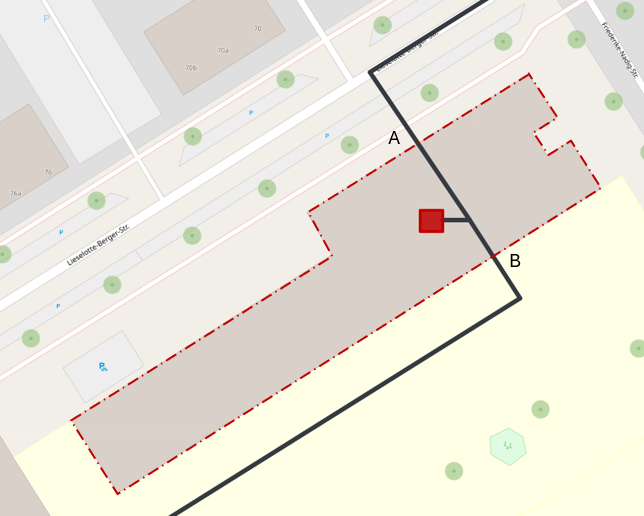
Currently (Aug. 2026), each energy centre has exactly one connection point. Multiple outlets – for example into separate sub-networks – can still be represented well:
Do not draw the energy centre (red area) as the complete building, but only as a small polygon around the generator itself, e.g. around the boiler. The actual building remains visible in the OSM background and serves purely for orientation. From the connection point of this area, run a short pipe to the outside and branch it into the individual sub-networks there.
The branching point is then located practically right at the generator, and the outlets can be routed in different directions or towards different sides of the building. Since the pipe lengths inside the building are very short compared to the rest of the network, this simplification has hardly any effect on the results.
Load profile calculation and building data
What sources are the demand data and standard load profiles based on?
The daily profiles for the individual building types come from extensive research work. A wide range of sources were evaluated for this, e.g.
- Leitfaden Energienutzungsplan Bayern (Bavarian Energy Utilization Plan Guide)
- Announcement of the rules for energy consumption values and comparison values in non-residential buildings (April 2015)
- SIA 2024
- VDI 3807 Part 2
and many other individual sources and studies. The standard load profiles also come from various sources. One example is the reference load profiles from BDEW. In addition, we’ve used further studies and freely available datasets, such as studies on electrical load profiles, and carried out our own analyses, such as evaluating presence profiles from Google Maps.
How are the load profiles calculated (methodology)?
The generation of demand profiles for space heating (and cooling) is essentially based on the degree-day method, i.e. a linear relationship is assumed between heat demand and outdoor air temperature. The tool offers several approaches for calculating the profile, depending on user input. For example, an approach was specifically developed for nPro that makes it possible, based on peak load (kW) and annual heat demand (MWh), to generate a precisely fitted profile that “hits” both values. Here, the degrees of freedom of the degree-day approach (heating limit temperature, target temperature, etc.) are optimized so that peak load and annual demand match the user inputs.
For space heating, domestic hot water, space cooling, process cooling, user electricity, and electric mobility, seasonal profiles are superimposed with daily profiles into an overall profile in a second step.
Can I upload my own load profiles?
Yes, if you already have load profiles for a particular energy demand type (e.g. domestic hot water), you can upload these directly for a building using the import function (e.g. copy & paste from Excel). nPro can process different time resolutions here. You can find out more here.
Which time resolutions does nPro support?
All calculation models in nPro are based on an hourly resolution. This cannot be changed; in particular, no 15-minute resolution can be selected. When uploading time series, however, nPro supports a wide range of different time resolutions: daily values, hourly values, 15-minute values, and many more. You can find a detailed overview here.
Are distribution losses within the building already included in the heat demand figures?
Yes, the space heating demands in nPro correspond to the amounts of heat that must be supplied by the generation system (e.g. condenser output of the heat pump, heat exchanger of the heating network, or heat generation of the electric heating element). Losses in the distribution pipes within the building are already included here. When entering your own demand values, you must therefore make sure that the values already include any distribution losses. This is important, for example, for domestic hot water, which can be provided decentrally (without significant losses) or centrally (with significant losses in circulation pipes).
Where does the weather data used by nPro come from?
The weather profiles stored in nPro come from the climate.onebuilding.org database. These are typical meteorological years (TMY), usually based on recent weather periods (e.g. 2000–2020), in order to best capture climatic changes. The EPW files contain hourly values such as temperature, humidity, wind speed, and solar irradiance, and can be manually uploaded to nPro if needed.
Building calculation
When are booster heat pumps automatically activated in buildings?
Booster heat pumps at the building level are automatically installed when heat demand in the buildings cannot be met via a heat exchanger due to insufficiently high network temperatures. If the set demands for domestic hot water and space heating are, for example, 60 °C, a flow temperature in the heating network of 60 °C + 2 K = 62 °C is sufficient to cover both demands directly from the network without a booster heat pump. If you set the network flow temperature to at least 62 °C in this example, the booster heat pump will not be added automatically. However, if the network flow temperature is (for at least one hour of the year) less than 2 K above the building’s flow temperature, the booster heat pump would be added automatically (a warning is displayed).
How is usable floor area defined?
The usable floor area is used to convert area-specific values (kWh/m² or W/m²) into absolute quantities such as annual energy demand in MWh or heating load in kW. If your kWh/m² values refer to the net floor area, you should enter the net floor area as the area. If the values refer to the gross floor area, enter the gross floor area accordingly. There is no additional logic behind the area figure; it serves solely to convert area-specific values into absolute values.
Can decentralized heat storage in buildings be taken into account?
Yes, decentralized heat storage can be taken into account for both domestic hot water and space heating. It reduces the building’s connection capacity but leads to higher investment costs.
Data import (data interfaces)
Can I upload a PDF file with building geometries?
Directly uploading PDF files for building import is currently not possible, since PDF files usually don’t contain georeferenced data. However, there are two options:
- You can use the free program QGIS to read the PDF file with georeferencing and export it as a shapefile or geoJSON file. This shapefile or geoJSON file can contain both building and network geometries and can be uploaded directly to nPro. The process is described step by step in this video tutorial.
- Check whether the creator of the PDF file can also provide geoJSON/shape files, since this georeferenced data can be uploaded directly to nPro. The PDF was often created with a program that can also export other georeferenced files.
Can I upload a dwg or dxf file?
No, currently (Aug. 2026) nPro does not yet support the import of dwg or dxf files. However, we plan to integrate this feature in one of the next versions.
Can I upload a Stanet file?
Yes, from version 4.2 onward, nPro also supports the import of Stanet files.
Energy center and system design calculation
How is series or parallel cascading represented in nPro?
The approach for cascade configurations is described in our fact sheet.
Is there a way in nPro to use groundwater as a heat source?
Yes, groundwater can be represented in nPro via the “heat/cold source” technology. Here you can specify both the available thermal capacity (e.g. based on the yield of the source) and the temperature of the heat source – if needed, also as a time-resolved profile. This allows groundwater usage to be modeled.
Why doesn't adding a heat storage tank reduce the capacity of the heat pump?
In the design calculation for the energy center, generation units are sized by default so that the maximum load can be covered by the generators alone (without using heat storage). This means that if the maximum heating load is 100 kW, a biomass boiler and a gas boiler, for example, would be sized so that their combined capacity is (at least) equal to this 100 kW heating load.
The reason for this is that, under a conservative design approach, you don’t want to rely on the storage tank being charged at the moment of maximum heating load. With heat pumps in particular, however, it can make sense to use the heat storage to cover peak loads. This can be achieved in nPro by disabling the “Conservative system design” option in the design calculation settings.
Why isn't a seasonal heat storage tank fully charged in summer in the simulation?
In nPro, operation is determined based on the selected objective function (usually minimum annual costs) rather than following predefined, control-engineering “intuitive” operating patterns. As a result, a large seasonal storage tank may not be fully charged at the start of summer – even if sufficient solar thermal output would be available.
The reason for this is as follows: if the storage tank is small relative to the available generation capacity, it can be fully charged within just a few sunny days. The optimization model knows the entire weather year and therefore “knows” in early summer that many more sunny days will follow over the course of the summer. It therefore only charges the storage tank as much as is needed for heat in the following days, since a fully charged storage tank causes heat losses. Only toward the end of the warm season (e.g. in October/November), when it’s clear that not many more sunny days will follow, is the storage tank typically fully charged in the simulation. This approach is optimal from a purely economic perspective, but isn’t always intuitive from a control-engineering point of view. However, the simulated result represents the most cost-effective operating mode and doesn’t differ, in terms of overall metrics (gas consumption, electricity costs, etc.), from a more intuitive operating pattern (whether surplus heat goes unused in spring or autumn is irrelevant for the overall annual view). We are, however, working on modeling this aspect of system operation for seasonal storage more realistically in future versions of nPro.
Is there a way to account for blocking periods and losses during defrost operation for the heat pump?
Yes, blocking periods can be modeled via a custom operating restriction profile in the heat pump settings. To do this, enter an hourly profile (e.g. 24 values like “1, 1, 0, 1, …”) to block individual hours.
Losses during defrost operation are not explicitly modeled in nPro. However, these can be accounted for on a flat-rate basis by adjusting the COP – depending on the calculation methodology used (Carnot model, data table, etc.).
What are typical days?
The design optimization in nPro is based on typical days. This means that a certain number of days are selected from the full annual course that represent the year as accurately as possible. nPro typically uses up to 60 typical days for the calculation, depending on the complexity of the energy system.
Using typical days reduces the computational effort and simulation time. For very complex energy systems, e.g. with seasonal storage, it can be useful to manually set a higher number of typical days, e.g. 100. The maximum number of typical days is 365.
Please note that, unlike the design optimization (1st calculation step), the operational simulation (2nd calculation step) always uses the full hourly resolution (365 days with 8,760 time steps).
Can I define custom component models for, e.g., heat pumps or boilers?
Yes, custom component models can be defined for some technologies. Currently, this is possible for heat pumps, solar thermal, and PVT collectors. For all other technologies, the general model parameters can be adjusted for the respective use case, e.g. the electrical or thermal efficiency of the boiler or CHP unit.
Can I account for my own time-variable electricity price profiles?
Yes, you can upload time-resolved electricity price profiles as a time series in the electricity grid settings. These are then taken into account with hourly resolution in the optimization calculation and can, for example, influence the size of the heat storage tank or a heat pump. Variable profiles can also be defined for electricity feed-in tariffs and the specific CO2 emissions for electricity drawn from or fed into the grid.
How does the design optimization work (methodology)?
In the design optimization, the systems are sized so that the selected objective function (usually the total annual costs) is minimized (full cost accounting based on the net present value method; including residual values and replacement investments in accordance with VDI 2067).
The optimization calculation is based on a mathematical optimization model, either a linear (LP) or a mixed-integer linear optimization model (MILP). More information on the optimization approach can be found on our research activities pages and in the documentation.
Can I define custom fuels (e.g. heating oil)?
Yes, you can also model other, non-predefined fuels in the simulation. To do this, you can redefine an existing energy carrier, e.g. treat biomass as heating oil, and change the three fuel parameters – specific CO2 emissions, primary energy factor, and purchase price – of the energy carrier being replaced to match the values for heating oil.
This approach is possible because the simulation balances energy quantities (kWh) rather than fuel-specific physical properties (such as viscosity).
Are the calculation models available as open source?
No, the optimization algorithms and simulation models are not available as open source.
What is an 'energy center' in nPro?
An energy center refers to the central energy supply of a neighborhood, a building, or another energy system. This can be a central heating plant, but also an air-source heat pump located in a building’s basement.
For a heating network, the central heat generators or heat sources are part of the energy center. For a cold district heating network with a geothermal field, the geothermal field would be part of the energy center; the decentralized heat pumps, on the other hand, would be defined in the buildings rather than in the energy center.
Can I upload my own generation profiles for photovoltaics or solar thermal?
Yes, in the settings for photovoltaics, solar thermal, PVT, or wind power, you can upload your own specific generation profile with hourly resolution. This can be helpful if you’ve created profiles using other software and want to use them instead of the profiles calculated by nPro.
What criteria are used to determine the optimal sizing of the generation units?
By default, economic viability is used as the objective function. The cost-optimal energy system is then determined – one that can fully cover the specified energy demands at the lowest total cost.
The optimization target considers the total system costs based on VDI 2067 (full cost accounting, including annualized investments with replacement investments and residual values). In addition, further optimization targets such as minimum electricity purchase or minimum CO2 emissions can be selected.
In the operational simulation, a cost-optimal operating mode of the systems is always assumed. More information on the optimization approach can be found in the optimization model documentation.
Which target metrics can be selected for the design optimization?
Various optimization targets can be selected in the energy center settings. These include:
- Annual total costs: The net present value of the overall system is minimized.
- Multi-objective optimization: costs and CO2 emissions: Here, multiple system designs are determined for different CO2 prices.
- CO2 emissions: The system’s annual CO2 emissions are minimized. This can lead to very uneconomical systems, since emissions alone are the deciding factor.
- Electricity purchase from the grid: The system’s annual electricity purchase from the grid is minimized.
Can I minimize the heat pump capacity in the design calculation?
Indirectly, yes: by adding a heat storage tank and disabling the “Conservative system design” setting, the optimization calculation will select a smaller heat pump size and use the heat storage tank to cover peak loads.
In addition, adding another heat generator for peak load coverage (electric heating element, boiler, etc.) can reduce the heat pump capacity.
What does the 'Conservative system design' setting do?
When the “Conservative system design” setting is enabled, an energy system is determined that can cover the maximum occurring energy demands using only the installed generation units. Storage is not factored in for load coverage in this case, since it’s assumed to be fully depleted at the hour of peak load.
This can be a drawback when a heat pump is operated together with a heat storage tank and an intelligent control system (e.g. predictive control) can charge the storage ahead of a load peak. In this case, the heat pump could be sized smaller.
Whether this option should be enabled therefore depends strongly on the later control logic. For systems with intelligent control, it can often be disabled in order to size systems smaller and use storage to cover peak loads.
Is it a problem if the electricity purchase price is lower than the feed-in tariff?
Yes. If the electricity purchase price in a given hour is lower than the feed-in tariff, this currently leads to model-driven behavior in the optimization: the model would, for economic reasons, assume that electricity is purchased cheaply and simultaneously fed in at a higher price.
To avoid this behavior, you should make sure that the purchase price is never, in any hour, below the feed-in tariff.
An alternative solution is to use the direct feed-in option for photovoltaics or CHP units. Here you can specify a tariff that may also be higher than the purchase price (hourly profiles can also be uploaded here).
Can I simulate a hydrogen CHP unit or a hydrogen boiler?
Yes. For a hydrogen CHP unit, you can use the fuel cell model. When waste heat recovery is enabled, this unit generates heat and electricity (like a CHP unit). The ratio is determined by the electrical and thermal efficiencies.
A hydrogen boiler can be represented using the standard boiler models by selecting an existing energy carrier (e.g. biogas) and adjusting its parameters (CO2 factors, primary energy factors, prices) to match hydrogen.
This approach is possible because the boiler model is based on a fairly simple model, which generates 0.X kWh of heat from 1 kWh of fuel according to the set thermal efficiency.
A unit is being sized too large or too small in the optimization. How can I change this?
If you want to directly influence the sizing of the units, you can manually specify capacity limits. You can set a lower or upper limit for the capacity. If you want to fix the capacity of a technology at a specific value, you can set the lower and upper limits to exactly that value. In this case, the unit’s capacity is no longer determined by the optimization calculation, but is fixed in advance.
Why do the full-load hours (or charge cycles) differ between the design calculation and the operational simulation?
The design calculation is based on a limited number of time steps (typical days). This means that not all 8,760 time steps are considered, but only representative typical days (usually between 20 and 60). In the operational simulation, on the other hand, the full year is simulated with all 8,760 time steps. As a result, the operational metrics can differ from the metrics of the design calculation.
I have a system with two natural gas CHP units. How can I control the cycling behavior of the units?
You have no direct influence on the cycling behavior of the units in the simulation. Since cycling is not economically priced (e.g. costs for start-up processes), the optimization calculation does not take this behavior into account.
Can I also select more than 2 boilers or CHP units?
In nPro, a maximum of two boiler technologies can be selected at the same time, for example a gas boiler and a biomass boiler. More than two boilers or CHP units (e.g. three gas boilers) cannot be represented explicitly, since nPro handles sizing by technology rather than by specific individual units.
This means: multiple units of the same technology produce the same result in the calculation as a single, combined generation capacity.
This is also because nPro uses an idealized operating model, in which boilers and CHP units can modulate between 0 and 100%, and factors such as part-load efficiencies or start-up costs are not taken into account.
Further details can be found in our publication: Design optimization of multi-energy systems using mixed-integer linear programming: Which model complexity and level of detail is sufficient? M. Wirtz, M. Hahn, T. Schreiber, D. Müller. Energy Conversion and Management, 240, 114249, 2021.
Can solar air absorbers be simulated for a cold district heating network or for regeneration?
Yes, solar air absorbers can be represented using the solar thermal model. You can either use the preset solar air absorber module or define your own collector models according to ISO 9806.
Alternatively, you can also upload your own generation profiles, e.g. originating from other software. In this case, the profiles are used directly in the design calculation rather than being calculated by nPro itself.
Why is my extraction rate for geothermal boreholes very low, e.g. only around 15 W/m instead of 50 W/m?
An extraction rate of 50 W/m is generally only realistic for fields with few boreholes. For larger borehole fields, such values are usually too optimistic and tend to be in the range of around 15–25 W/m, depending on the boundary conditions.
There are several ways to influence the extraction rate per meter of borehole:
- Adjust the minimum inlet temperature: The lower the permitted minimum brine temperature at the borehole inlet, the higher the extraction rate can be.
- Reduce the design period: A consideration period of, for example, 50 years is fairly conservative and lowers the permissible extraction rate. Shorter periods lead to higher extraction rates per meter of borehole.
- Increase the borehole spacing: Greater distances between boreholes reduce mutual thermal interference and increase the possible extraction rate per meter.
- Optimize the field geometry: Instead of a nearly square field (e.g. 14 × 16 boreholes), an “elongated” arrangement (e.g. 4 × 50) can be advantageous, since more heat can flow in from the surroundings.
- Plan for regeneration: If summer cooling loads are dissipated via the borehole field, this increases the amount of heat that can be extracted annually.
Can air heat exchangers (dry coolers) be simulated?
Yes, modeling can be done in several ways:
- via the air-source heat pump or compression chiller model (with correspondingly high COP values, so that the electricity demand essentially represents the circulation pump power),
- via the solar thermal model with adjusted ISO 9806 parameters for a custom collector type, or
- via the heat/cold source model, if a specific hourly generation profile is already available.
These approaches allow various air heat exchanger operating modes to be flexibly represented.
Can I specify a degree of self-sufficiency for the design optimization?
No, a degree of self-sufficiency cannot be specified directly.
However, you can manually limit electricity purchase (MWh/year) or select the “minimize electricity purchase” optimization target. This indirectly increases the degree of self-sufficiency.
Economic viability
What are the cost parameters stored in the tool based on?
The cost parameters are based on various sources, including VDI 2067 as well as our own estimates. The figures in nPro make no claim to accuracy or completeness. If you have your own cost values, you can enter them in the software.
Good sources for cost parameters include the technology catalog for municipal heat planning of the state of Baden-Württemberg and the technology catalog of the Competence Center for Municipal Heat Transition.
Can statutory funding mechanisms be taken into account?
Yes, a range of funding mechanisms are supported in nPro. These include, for example, investment subsidies, which can be set technology-specifically for units in buildings (heat transfer stations, booster heat pumps, etc.), the heating network, and units in the energy center. The BEW operating cost subsidy for solar thermal and large-scale heat pumps can be represented directly. Feed-in tariffs and subsidies for self-consumed electricity can also be defined in detail for photovoltaics, combined heat and power units, wind power, and hydropower.
Funding mechanisms that cannot be directly represented in nPro can generally still be taken into account in the economic calculation using suitable workarounds.
What methodology is used for the economic calculation?
The economic calculation is essentially based on the German standard VDI 2067, which corresponds to the net present value method. Future payments are discounted to the investment year (year 0). Replacement investments after the end of the service life, as well as residual values at the end of the project period, are taken into account.
Are the displayed costs gross or net?
All cost figures in nPro are to be understood as net (excluding VAT).
Data protection and IT security
Where can I find IT security information for the approval process at my company?
All relevant information on IT security can be found in our IT security document. In addition, the terms of use (which are included with every quote) contain important information on data protection, along with a data processing agreement (DPA) in the appendix. For further questions, our support team is happy to help.
Is the server infrastructure located in Germany?
Yes, the servers used by nPro are located in Germany. The data center is located in Frankfurt am Main.
Is login via Single Sign-On (SSO) possible?
Yes, from version 4 (November 2025) onward, login via Single Sign-On (SSO) through Microsoft (Entra ID) is available.
Is login with two-factor authentication (2FA) possible?
Yes, for additional security, login with two-factor authentication (2FA) is available from version 4.4 (April 2026) onward.
Does nPro develop the software entirely in-house?
Yes, all nPro software is developed 100% in-house. This allows us to ensure high quality control, rapid development of new features, and seamless integration of all software components.
Is my project data protected from unauthorized access?
For our customers, data security is of the utmost importance, since users enter sensitive project data into the tool. We therefore place great emphasis on the security of our systems and, when needed, engage external developers and consultants to ensure data security permanently and reliably.
Is my data protected against data loss?
nPro uses two different redundant systems for data backup:
- Daily backups by the IT infrastructure provider, enabling recovery of all server data.
- Additionally, daily backup of project and user data on a separate commercial cloud system.
All project data older than one day (and therefore captured by the daily backup) is thus redundantly protected against data loss.
Who has access to the project data?
Access to project data is restricted exclusively to the user themselves, unless they actively share the project.
For support purposes, a project can be shared specifically with an nPro employee. In rare exceptional cases, the nPro software development team may access data – exclusively to maintain critical IT services or at the customer’s explicit request.
Does nPro comply with German data protection regulations?
Yes, nPro Energy complies with German data protection regulations. The server infrastructure is located entirely within the territory of the Federal Republic of Germany, currently in a data center in Frankfurt am Main.
Licenses and ordering
Can a colleague also use my user account?
No, user licenses are tied to individual persons. We currently don’t offer a company-wide license (floating license).
Please purchase a personal single-user license for each user who uses the tool. Prices are set fairly accordingly.
nPro monitors license usage through technical and organizational measures and reserves the right to take action in the event of violations of the license terms.
Can we add more licenses later on?
Yes, you can increase the number of licenses at any time. Existing licenses are credited on a month-by-month basis for the remaining term and deducted from the price of the new order. From version 4.9 (October 2026), orders can be placed directly in the tool under “Manage team”.
How is billing handled?
The usage fee is calculated in advance for the respective booked period. You’ll receive an invoice for this. Payment can be made by bank transfer or credit card.
How do contract terms and cancellation work with nPro?
There are two options:
License without subscription (no automatic renewal):
- The license runs for a fixed period (for existing customers: at least 12 months).
- Cancellation is therefore not necessary.
- If you want to continue using the license after it expires, you must actively initiate the renewal.
Optional: subscription (with automatic renewal):
- To simplify annual reordering, you can choose an automatic renewal of the license.
- The license then also runs for a fixed period (for existing customers: at least 12 months). Once the license expires, however, it’s automatically renewed for another 12 months.
- You can deactivate the automatic renewal at any time up to 14 days before expiry under “Manage team”.
In both cases, invoicing takes place at the start for the entire usage period.
Are software updates free of charge with nPro?
Yes, all updates to the nPro software are free of charge and are provided automatically.
How long does it take to convert my demo account into a commercial account?
The conversion takes effect immediately. If you enter the email address of your demo account as the contact email address in the order form, the account is automatically converted into a commercial account as soon as the order is completed. All projects and settings are fully retained.
How can I transfer my nPro license and my projects to a colleague?
You have three options for transferring your license and your projects:
- Transfer the account directly: Simply change your email address in the user settings to your colleague’s email address (and change the password). Advantage: all projects and project shares are fully retained.
- Create a new account: Your colleague can create their own account, and we’ll transfer the license upon request. You can then share selected variants or projects with them. They can optionally create a copy of these projects for themselves (copy variant into a new project).
- Manual transfer by nPro: On request, we can also transfer projects manually to another account. This requires manual effort and can take a few days. Simply contact us by email.
Is technical support available?
Yes, we offer free technical support for users with a demo or commercial license, to help you use the software. Support can be reached by email or phone; video calls can also be arranged.
How does the ordering process work?
New customers can use our order page. After submitting the form, you will receive an invoice as a PDF, which can be paid by bank transfer or credit card. Existing customers can renew or add licenses in the tool under “Manage team”.
You can also place orders by email to info@npro.energy.
For larger teams or special requirements, please contact us by email. We’ll then prepare an individual quote for you, with adjusted terms of use if needed.
What payment methods are available?
You can pay by bank transfer or credit card. The bank transfer details can be found on the invoice.
We want to try out nPro first. Can we also order nPro for less than 1 year?
Yes, that’s possible. For new customers, we offer the option to order nPro initially for a period of less than 12 months (see order page).
In addition, a free 3-week demo license is available to you.
What does a commercial license for nPro cost?
For most of our customers, nPro already pays for itself if the software saves two working hours per month.
Current prices can be found on our order page.
Can the nPro license be used on a monthly basis and paused? Is there a minimum term?
The nPro license model is a prepaid model: you purchase licenses for a specific period, and pausing is not possible.
For the first order, there’s currently (Sep. 2026) a 10% new-customer discount, and you can choose any term you like, e.g. just 6 months.
For follow-up orders, the minimum term is 12 months. Details can be found on the order page.
Academic license
I'm an academic user. Can I use nPro free of charge?
Yes, academic users can generally use nPro free of charge for their research.
However, this does not include commercial contract research or consulting services for companies. Details on this can be found in the terms of use.
nPro reserves the right to take legal action and, if applicable, claim damages in the event of violations of the license terms.
Do I need to prove that I'm entitled to use an academic license?
No, no formal proof is required during the registration process.
You simply register with the academic license – it’s assumed that the terms of use will be complied with.
We reserve the right to spot-check compliance with the terms and to respond accordingly in the event of violations.
May I use the academic license if my thesis is carried out in cooperation with a company?
Yes, the academic license may be used if nPro is used exclusively for the academic thesis. Using the academic license is not permitted if, as part of the cooperation, additional activities are carried out for the company that aren’t directly related to the thesis – for example commercial consulting, project work, or contract research. In such cases, a commercial license is required. Details on this can be found in the terms of use.
Additional services from nPro
Is nPro Energy interested in publicly funded research projects?
Yes, nPro regularly participates in publicly funded research projects. If you’re planning a project and are looking for a project partner in the field of neighborhoods, heating networks, and/or software, feel free to reach out to us. We also support proposal writing with our experience and expertise.
Can I use nPro's calculation models via an API?
We’re working on making as many of nPro’s calculation functions as possible available modularly via an API. This would allow you to integrate functions such as generating heat demand or PVT generation profiles into your own in-house tools.
Currently (Aug. 2026), however, no API is available, and none is planned for 2027 either.
Can nPro help us with the development of internal company tools?
nPro has a broad foundation of calculation and simulation algorithms — from generating load profiles to solar thermal and PVT calculations to complex optimization algorithms. Do you need source code for a solar thermal calculation according to ISO 9806? A PVT collector model? Or would you like to use parts of our optimization algorithms? Feel free to reach out to us!
Does nPro also provide planning services?
We only offer support for planning projects in special cases. Our focus is on developing and operating the nPro software. We’re happy to recommend qualified planning firms. Simply contact us by email.
About nPro Energy
How many companies use nPro?
Currently (August 2026), more than 500 companies have purchased a commercial license for the nPro software. The number of active users is approximately 120–180 per day. A selection of our customers can be found on the references page.
Our customers come from the fields of energy supply, planning firms, architecture, research & development, municipalities/cities, and industry. Most users are based in Germany, but we also have users from Austria, Switzerland, the Netherlands, Spain, Italy, France, Belgium, Denmark, Ireland, North Macedonia, Greece, as well as overseas (including Canada, the USA, and South Korea).
Is nPro Energy an economically independent company?
nPro Energy is fully economically independent. There are no economic dependencies on other companies or institutions.
Who founded nPro, and with what goal?
nPro Energy was founded as a spin-off of RWTH Aachen University by Dr.-Ing. Marco Wirtz in 2022. The startup’s goal is to develop planning software that allows engineers and planners to quickly and easily simulate and design energy systems for buildings and neighborhoods. Further information can be found on the about us page.
Technical questions and issues
What technical requirements are necessary to use nPro?
An internet connection is required to use nPro. No installation or administrator rights are needed. Software updates are installed automatically. For large neighborhoods with more than 1,000 buildings, a powerful computer (e.g. with at least 16 GB RAM and a modern processor) can be beneficial to ensure smooth operation.
Is an internet connection required?
Yes, a permanent internet connection is required to use nPro. An unstable connection can lead to problems during use.
How do software updates work in nPro?
Software updates are provided automatically over the internet. This means you always use the latest version of nPro. Updates add new features or fix bugs.
Do I need to install nPro on my PC?
No, nPro can be used without installation. All you need is an internet browser (e.g. Chrome, Firefox, or Safari) and an internet connection.
Which internet browsers can I use nPro with?
nPro supports the browsers Chrome, Firefox, and Safari. Other common browsers generally work without issues as well. If you run into difficulties, feel free to contact us.
The software crashes after just a few clicks. What's the cause?
If nPro crashes after just a few clicks and a white screen appears, this may be due to a browser add-on (e.g. in Chrome or Firefox) — typically the “Google Translate” add-on. Please disable or uninstall this add-on, use a different browser, or open a “private window” (Firefox) or “incognito window” (Chrome).
If the error persists, feel free to contact us.
The background map is not displayed – what is the cause?
If buildings and the heating network are visible but the background map remains blank, the loading of map tiles is usually being blocked by your company network’s firewall or proxy. The tiles are not served by nPro itself but retrieved from an external map service (tile.openstreetmap.de).
To check this, you can open nPro outside your company network (e.g. via a mobile hotspot) or switch the map view to “Satellite”. If the map is displayed then, please ask your IT department to allow the domain tile.openstreetmap.de.