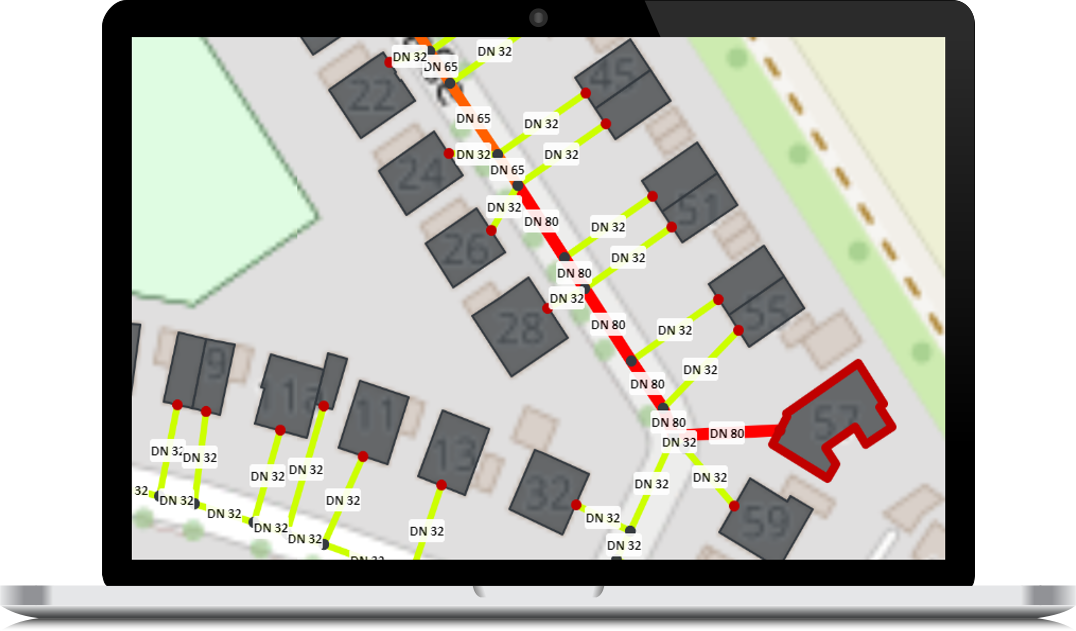
GIS building data with heat demand for district heating planning
Reliable decisions in district heating planning start with a solid data foundation. With the GIS-referenced building data available via nPro, you receive structured, quality-assured information on floor areas, building types, and heat demands – ready for use in planning, simulation, and potential analyses. Instead of preparing heterogeneous raw datasets yourself, you obtain a harmonized data package for your selected area. On this page, you will learn what information is included, how the data is processed, and how the ordering process works.
What information is included?
The delivered building dataset includes a structured and harmonized list of attributes for each building. The classification of Building Type and Building Specification follows the system logic used in the nPro software, enabling direct processing without additional mapping steps.
- Georeferenced building geometry (polygon, GIS-compatible)
- Building type (e.g. residential, school, ...)*
- Building specification*
- Gross floor area (in m²)
- Footprint area (in m²)
- Year of construction
- Number of floors
- Building height (in m)
- Annual space heating demand (in kWh)
- Annual domestic hot water demand (in kWh)
* Classification is based on the building type and specification logic implemented in nPro.
Data sources and processing
The building data is based on a combination of multiple official and open data sources (which may vary depending on the federal state). These sources are merged into a unified data model and harmonized to ensure a consistent and reliable data foundation.
Typical data sources include:
- OpenStreetMap (OSM) – usage and address information
- CityGML – building heights and usage types
- Census data – building age classes and structural characteristics
- Regional heat cadastres (e.g. for North Rhine-Westphalia or Baden-Württemberg) – heat demand information
Processing steps include:
- Harmonization of different geometry and data formats
- Data merging and attribute mapping into the nPro data model
- Plausibility checks of key indicators
- Standardized structuring for GIS and nPro import
How the request process works
The process for requesting building data can be initiated directly within the nPro software:
- Select area: Draw your area (polygon) on the map of a new nPro project ("Define data request area").
- Request a quote: Select the option "Request detailed building data" and complete the request form.
- Receive quote: We review your request and send you a non-binding offer.
- Accept offer / Payment: After accepting the offer, you can proceed with payment.
- Receive data: After payment, we deliver the building dataset within a few business days – for smaller datasets as a project variant in an nPro user account of your choice, or for larger datasets as a GeoJSON file.
- Use the data: You can directly use the delivered data in nPro or in other software.
Notes on accuracy and use
The delivered values – particularly the heat demand figures – are based on available official and open data sources as well as methodological processing and harmonization. Coverage, timeliness, and level of detail may vary by region. The data is intended as a planning and analysis basis and does not replace a building-specific on-site assessment.
 English
 Deutsch